 MY PROJECTS · SMS NOTIFICATIONS
How customers choose Pioneer text notifications
Public documentation of the opt-in process in My Projects at catalog.mypioneerroofing.com. The My Projects requires sign-in; this page allows the process to be reviewed without access to any customer account.
Sender approval and delivery testing are pending. This page does not collect phone numbers or enroll anyone. Customer opt-in and phone verification remain unavailable until setup and testing are complete. The examples below document the implemented portal controls; they do not represent a live SMS subscription.
Separate choices for each property and program
- The customer signs in to My Projects and selects a property they own.
- They open Invoices → Invoice text reminders for billing or Storm History → Manage alerts for storm notifications. Neither program is selected by default. A saved quote, phone number, or purchase is not SMS consent.
- When delivery is available, they enter a mobile number they control, request a verification code, and enter that code. Verification alone does not enroll them.
- They separately select the program’s SMS option and its unchecked consent box, then save preferences. Billing consent does not enroll them in storm alerts, and storm consent does not enroll them in billing texts.
- Consent and phone verification are recorded server-side. They can turn each program off in the portal or reply STOP to block texts from the shared sender.
Support: 469-909-1423 · help@mypioneerroofing.com
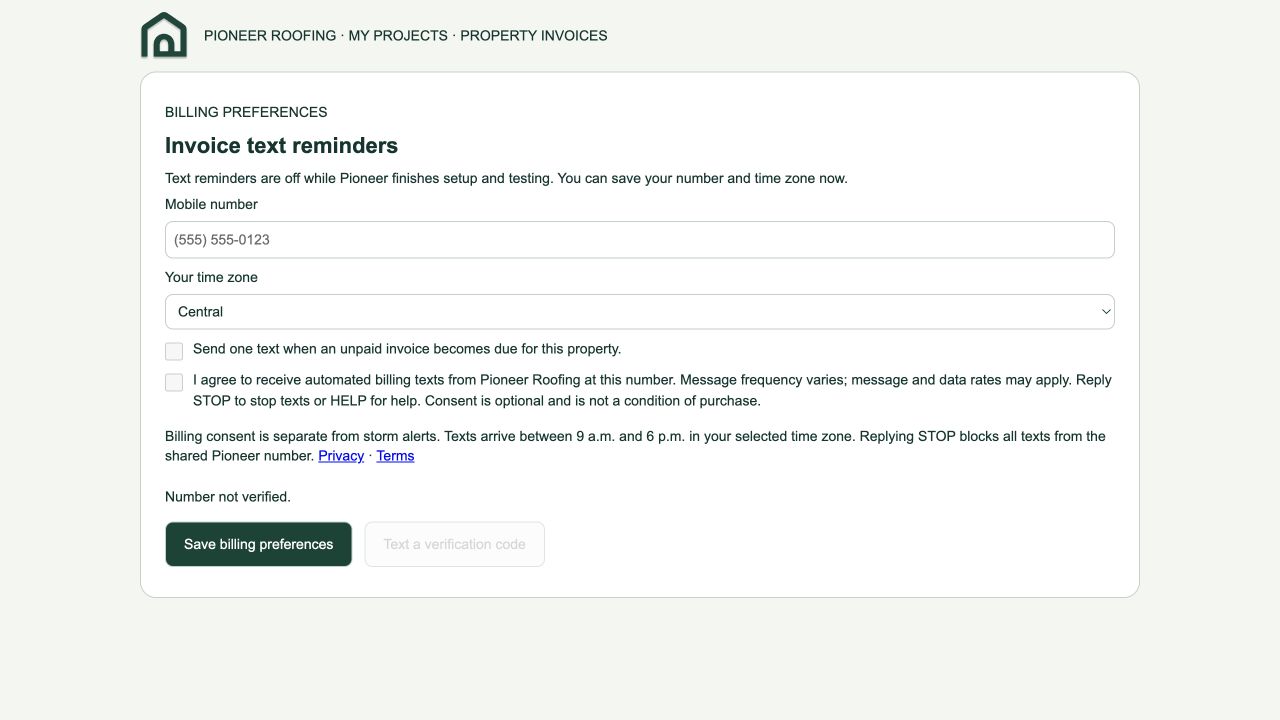
Billing consent: Invoices tab
The customer supplies their mobile number and time zone, then chooses the following separate, initially unchecked controls:
☐ Send one text when an unpaid invoice becomes due for this property.
☐ I agree to receive automated billing texts from Pioneer Roofing at this number. Message frequency varies; message and data rates may apply. Reply STOP to stop texts or HELP for help. Consent is optional and is not a condition of purchase.
Billing consent is separate from storm alerts. Texts arrive between 9 a.m. and 6 p.m. in your selected time zone. Replying STOP blocks all texts from the shared Pioneer number. Privacy · Terms
Save billing preferences
The server requires explicit consent and a verified number before enabling billing. Only an unpaid issued invoice due that day qualifies, with a fresh CompanyCam check before sending. Paid, voided, cancelled, draft and zero-balance invoices are excluded. No payment is collected by text.
Storm consent: Storm History tab
Customers choose hail size, wind speed and distance thresholds for their property. When SMS is available, the text-message option reveals mobile-number verification and this initially unchecked consent:
☐ Text message (SMS)
Mobile number → Send verification code → Enter 6-digit code → Verify number
☐ I agree to receive automated Pioneer Roofing storm alerts at this number. Consent is optional and is not a condition of purchase.
Message frequency varies with qualifying reports. Message and data rates may apply. Reply STOP to opt out or HELP for help. Privacy · Terms
☐ I agree to monitoring this property’s address for nearby reported hail and wind and receiving the alerts I selected.
Save alert preferences
The server requires separate SMS consent and verified phone ownership. These are nearby reported-weather notifications, not emergency warnings. Customer messaging remains off during registration.
Opt-out and mobile privacy
Reply STOP to stop messages from the shared sender. For assistance, reply HELP or contact Pioneer using the phone or email above. Portal settings can disable billing or storm notifications independently. No promotional messages are included in these subscriptions.
Mobile information, SMS opt-in data, and consent are not sold or shared with third parties or affiliates for marketing or promotional purposes. Delivery providers process only the information needed to deliver and manage messages.